

Transform your legal practice with AI-powered automation—reclaim your time and serve more clients
It’s 9:47 PM on a Tuesday.
You’re still at your desk—not reviewing case strategy or preparing for tomorrow’s deposition, but chasing down an unpaid invoice, manually entering client information into three different systems, and responding to a lead who first reached out… four days ago.
The coffee went cold two hours ago. Your family is asleep. And somewhere in the back of your mind, you’re calculating whether that potential client found another attorney while you were buried in paperwork.
Sound familiar?
If you’re a solo practitioner or running a small law firm, this isn’t just an occasional bad day—it’s the reality of practicing law in an industry that still operates like it’s 1995. While other professions have embraced technology for solo attorneys and automated their administrative burdens, lawyers remain trapped in a cycle of manual tasks that steal time from what actually matters: practicing law and serving clients.
But here’s the thing—it doesn’t have to be this way.
This guide will show you exactly how to streamline legal processes using AI automation, transforming your practice from a time-consuming grind into an efficient, client-focused operation. Whether you’re handling personal injury cases, family law matters, or criminal defense, the principles here apply to every practice area.
Let’s get your evenings back.
 The Hidden Cost of NOT Streamlining Your Legal Practice
Before we dive into solutions, let’s be honest about the problem. Because if you’re like most attorneys, you’ve probably normalized inefficiencies that are quietly draining your practice.
The Numbers Don’t Lie
According to the American Bar Association’s 2025 Legal Technology Survey, the average solo practitioner spends:
 10-15 hours per week on administrative tasks (that’s 520-780 hours annually)
 $4,500 per month in opportunity cost from missed or delayed lead responses
- 23% of billable time lost to document creation and management
- 45+ days average time to collect payment on invoices
But the most alarming statistic? 78% of potential clients hire the first attorney who responds to their inquiry. When you’re stuck in administrative quicksand, you’re not just losing time—you’re losing clients to competitors who picked up the phone first.
The Compound Effect of Inefficiency
Think about this: If you lose just two potential clients per month because you couldn’t respond quickly enough, and each client would have been worth an average of $3,500 in fees, that’s $84,000 in annual revenue walking out the door.
Add in the 12+ hours weekly you spend on tasks that could be automated, and you’re looking at roughly 600 hours per year—time that could be spent on billable work, business development, or simply being present with your family.
This isn’t about working harder. It’s about working smarter through legal practice automation.
 Understanding Legal Process Automation: What It Really Means
Let’s clear up a common misconception: automation doesn’t mean replacing lawyers. It means eliminating the repetitive, time-consuming tasks that don’t require a law degree so you can focus on work that does.
What Can Actually Be Automated?
Legal process automation falls into several categories:
Client Acquisition & Intake
– Initial lead response and qualification
– Appointment scheduling
– Intake form collection and data entry
– Follow-up sequences for prospects who aren’t ready to commit
Client Communication
– 24/7 FAQ responses
– Appointment reminders
– Case status updates
– Document request notifications
Document Management
– Template-based document generation
– Electronic signature collection
– File organization and retrieval
– Deadline tracking and alerts
Financial Operations
– Time tracking
– Invoice generation
– Payment reminders
– Accounts receivable follow-up
Practice Operations
– Task assignment and tracking
– Calendar management
– Conflict checking
– Reporting and analytics
The key insight here is that solo practitioner tools have evolved dramatically. What once required expensive enterprise software and dedicated IT staff is now accessible to solo attorneys and small firms through cloud-based, AI-powered solutions.
The 5 Pillars of a Streamlined Legal Practice
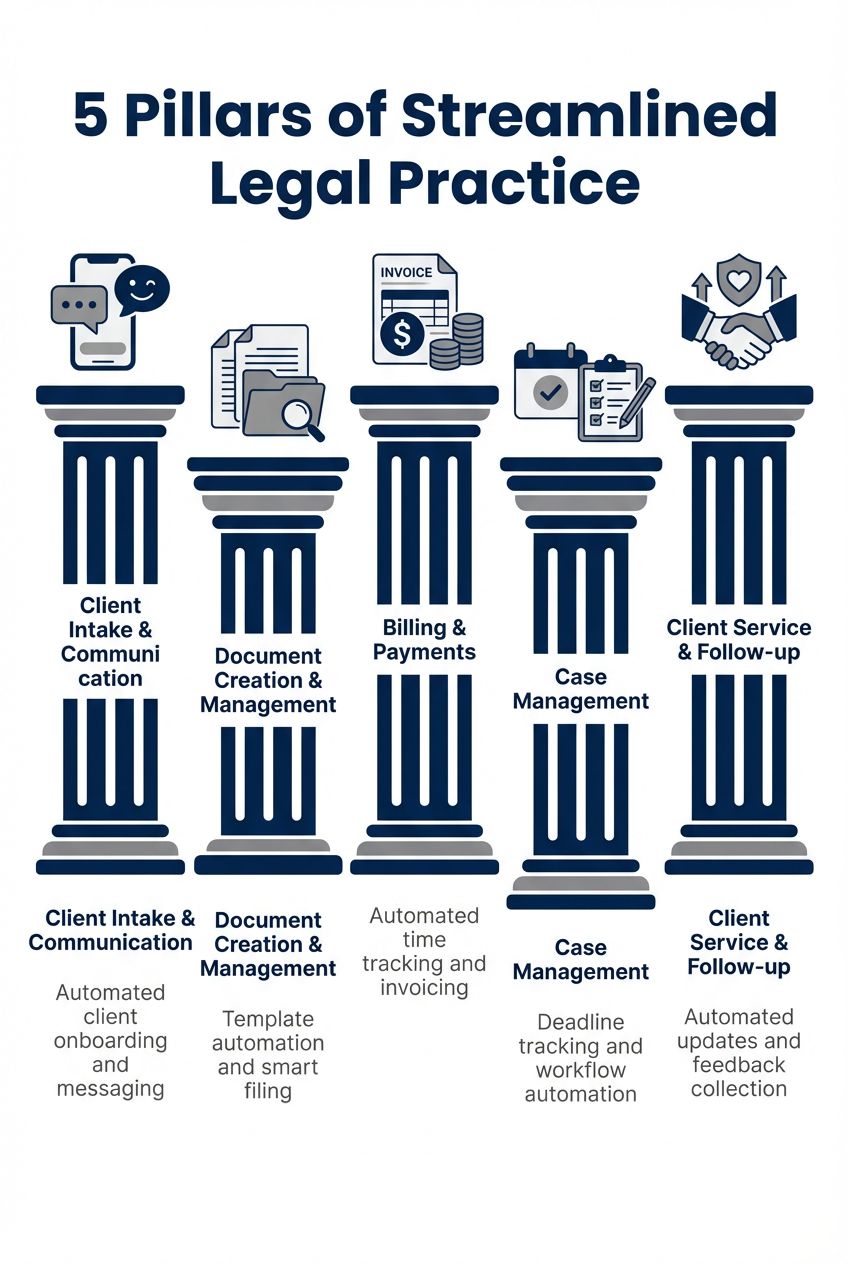
The five essential pillars that transform a chaotic practice into a streamlined operation
Manual vs. Automated: A Side-by-Side Comparison
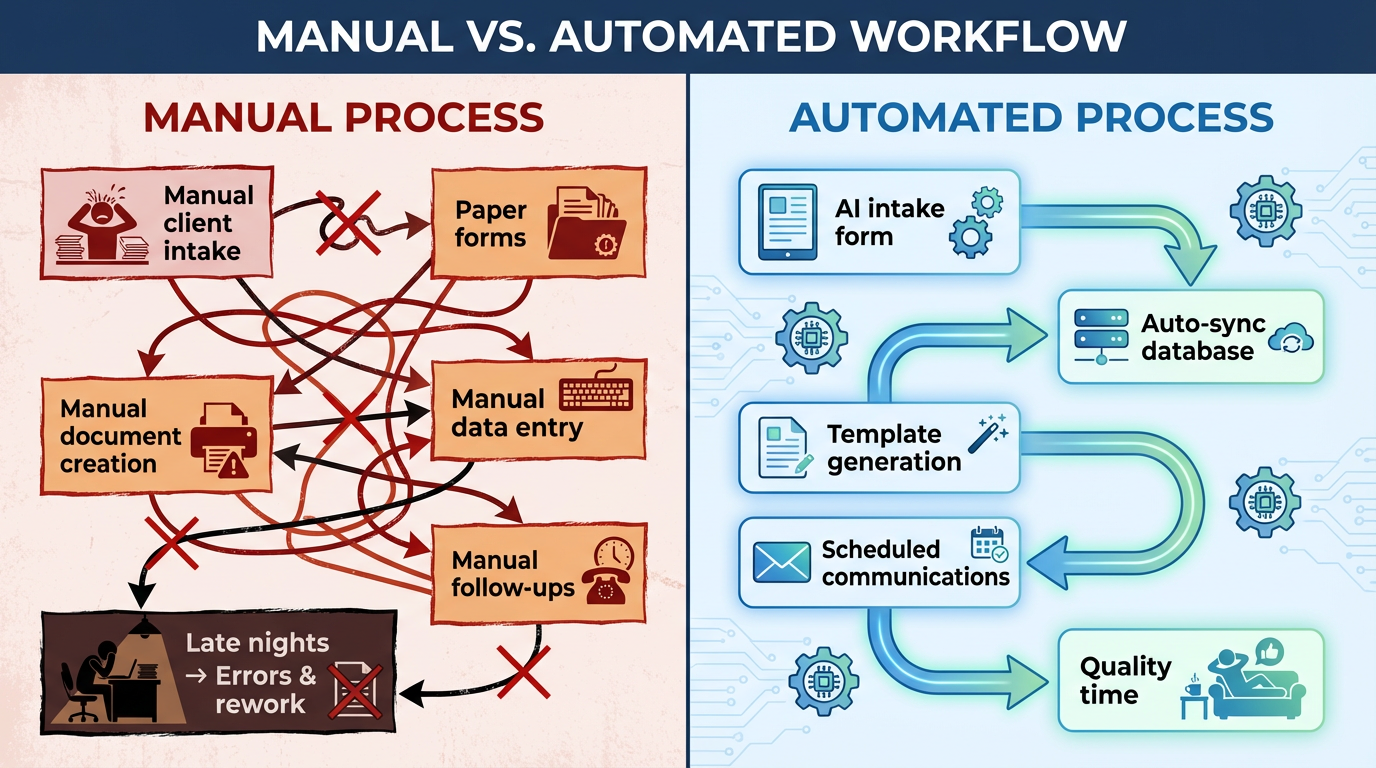
See the dramatic difference between traditional manual workflows and modern automated processes
The AI Difference: From Automation to Intelligence
Traditional automation follows rigid rules: “If X happens, do Y.” Useful, but limited.
AI solutions for lawyers add a layer of intelligence. An AI-powered system can:
- Understand natural language questions from potential clients
- Adapt responses based on context
- Learn from interactions to improve over time
- Handle complex, multi-step conversations without human intervention
For example, a traditional automated response might send a generic “Thanks for contacting us” email. An AI receptionist can have a full conversation with a potential client, understand their legal issue, determine if it’s within your practice area, assess urgency, collect preliminary information, and schedule a consultation—all while you’re in court.
That’s the difference between basic automation and attorney AI assistant technology.
 Essential Solo Practitioner Tools & Technology for Every Practice Area
Now let’s get practical. Here are the core automation areas every attorney should address, starting with the highest-impact opportunities.
Client Intake Automation: Stop the Lead Leakage
Your client intake process is the front door to your practice. If it’s broken, nothing else matters.
The harsh reality: most law firm websites are black holes. A potential client fills out a contact form at 8 PM, and then… nothing. By the time you respond the next morning, they’ve already contacted three other attorneys.
The Solution: Automated Legal Systems for Intake
Modern client intake automation includes:
- Instant response systems that engage leads within seconds, not hours
- Smart qualification that asks the right questions to determine fit
- Self-scheduling capabilities so prospects can book consultations without phone tag
- CRM integration that automatically creates client records and assigns follow-up tasks
Consider implementing an AI embedded chat on your website. Unlike static contact forms, these chatbots proactively engage visitors, answer preliminary questions, and guide them toward scheduling a consultation—converting passive browsers into active leads.
For phone-based intake, an AI phone system can handle incoming calls 24/7, collecting information and scheduling appointments even when you’re unavailable. No more missed calls means no more missed opportunities.
Quick Win: Start by auditing your current response time. To sreamline legal processes you need to know how long does it typically take for a new lead to hear from you? If it’s more than an hour during business hours (or if after-hours leads wait until morning), you’re losing clients.
Document Automation: Reclaim Your Writing Time
Be honest: how much of your document creation is truly original legal work, and how much is reformatting the same templates with new client information?
For most attorneys, the ratio is depressing. Engagement letters, retainer agreements, discovery requests, standard motions, these documents follow predictable patterns. Yet many lawyers still create them manually, copying and pasting from old files and hoping they caught all the placeholders.
The Solution: Template-Based Document Generation
Comprehensive document automation for legal practices delivers:
- Smart templates that auto-populate with client data from your CRM
- Conditional logic that includes or excludes sections based on case type
- E-signature integration for immediate client execution
- Version control so you always know you’re working with the latest template
The time savings are substantial. Attorneys who implement document automation report saving 8-10 hours per month on document creation alone. That’s an extra 100+ hours annually to spend on substantive legal work.
Pro Tip: Start with your five most frequently used documents. Calculate how long each takes to create manually, then multiply by how often you create them. That number represents your automation opportunity.
Billing & Collections: Get Paid What You’re Worth
Here’s a painful truth: the average solo practitioner writes off 10-15% of billable time due to poor tracking, and waits 45+ days to collect on invoices. That’s money you’ve already earned sitting in limbo.
The Solution: Attorney Automation Software for Billing
Modern billing automation transforms collections through:
- Passive time tracking that captures billable activities without manual entry
- Automated invoice generation triggered by case milestones or schedules
- Payment link integration so clients can pay directly from their invoice
- Smart payment reminders that follow up automatically on overdue accounts
The results speak for themselves: law firms that automate billing typically reduce collection time from 45+ days to under 14 days and see a 70% improvement in collection rates. That is a streamline legal processes in action.
Budget Reality: You don’t need expensive practice management software to automate billing. Many standalone tools integrate with your existing systems for under $50/month.
Communication Automation: Be Everywhere Without Being Available
Your clients want to reach you. Potential clients want answers. And you want to be in court, conducting depositions, or occasionally sleeping.
This is where legal chatbot solutions and communication automation create magic.
The Solution: Multi-Channel AI Communication
An AI conversational chat system trained on your firm’s specific information can:
- Answer frequently asked questions about your practice areas
- Provide case status updates to existing clients
- Qualify new leads and collect intake information
- Schedule appointments and send confirmations
- Handle multiple conversations simultaneously
The key is training your AI on your specific practice. Generic chatbots frustrate users with irrelevant responses. A properly configured attorney AI software solution knows your fee structures, practice areas, jurisdictions, and procedures.
Combine this with an AI receptionist for phone calls, and you’ve created a 24/7 communication system that handles routine inquiries while flagging urgent matters for your attention.
Practice Management Integration: The Command Center
Individual automation tools are valuable. But the real transformation happens when everything works together in a unified practice management system.
The Vision: End-to-End Automation
Imagine this workflow:
- A potential client visits your website at 11 PM
- Your AI chat engages them, qualifies the lead, and schedules a consultation
- The system automatically creates a prospect record in your CRM
- Pre-consultation intake forms are sent and completed
- You walk into the consultation fully informed
- After signing the engagement letter (electronically), the client’s matter is automatically created with standard tasks and deadlines
- Throughout the case, status updates are sent automatically
- Upon resolution, final billing and satisfaction surveys go out without manual intervention
This isn’t science fiction. This is solo attorney automation in 2026.
For a comprehensive overview of how AI can function as a complete team member handling these workflows, see The Complete Guide to AI Employees for Solo Attorneys.
The Time You’ll Save: Automation Impact by Area
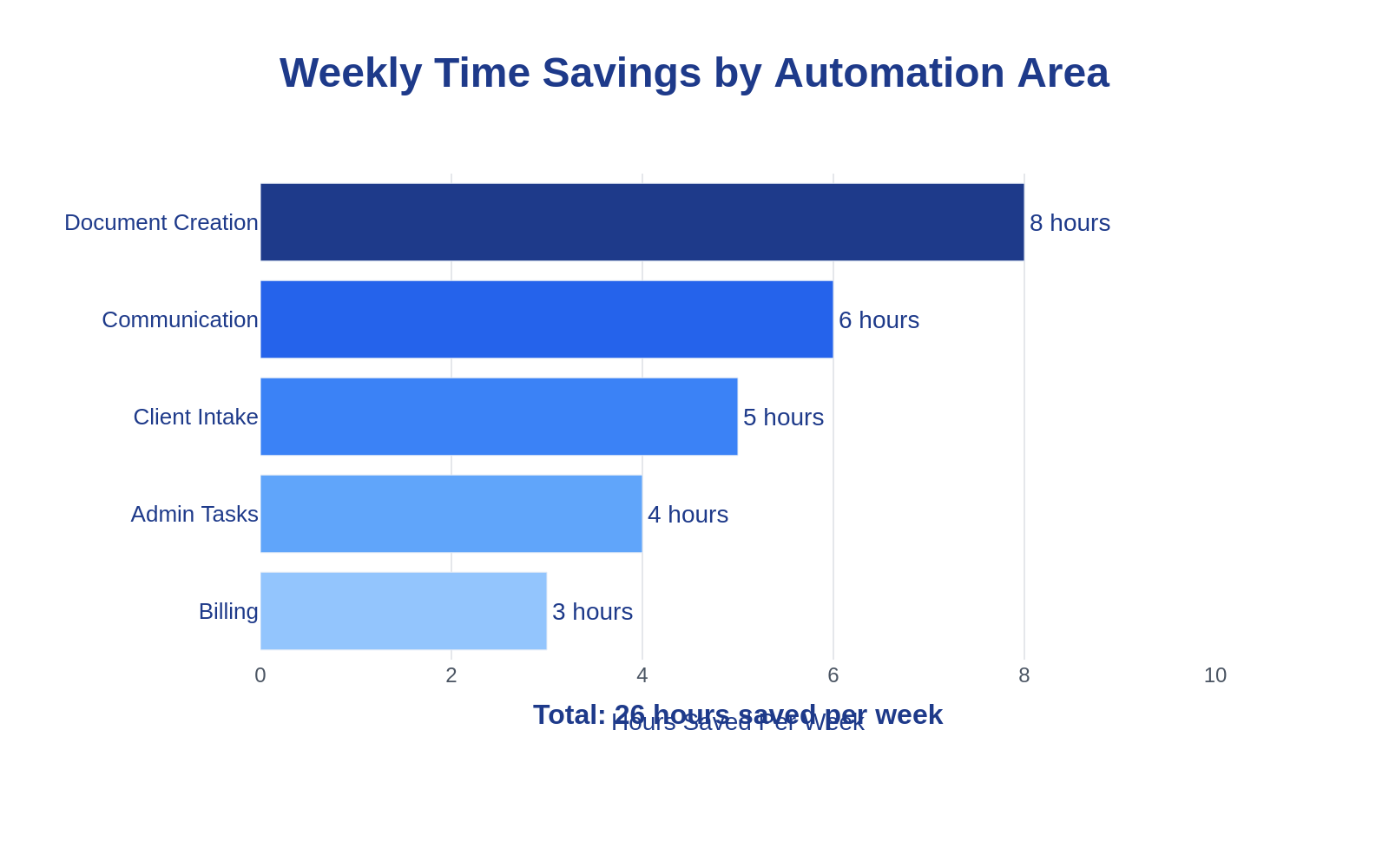
Comprehensive automation can save you over 26 hours per week—that’s more than 3 full working days
 AI Solutions for Lawyers: Your 30-60-90 Day Implementation Roadmap
Theory is great. Execution is better. Here’s a practical roadmap for implementing legal tech for solo lawyers without overwhelming yourself or your practice.
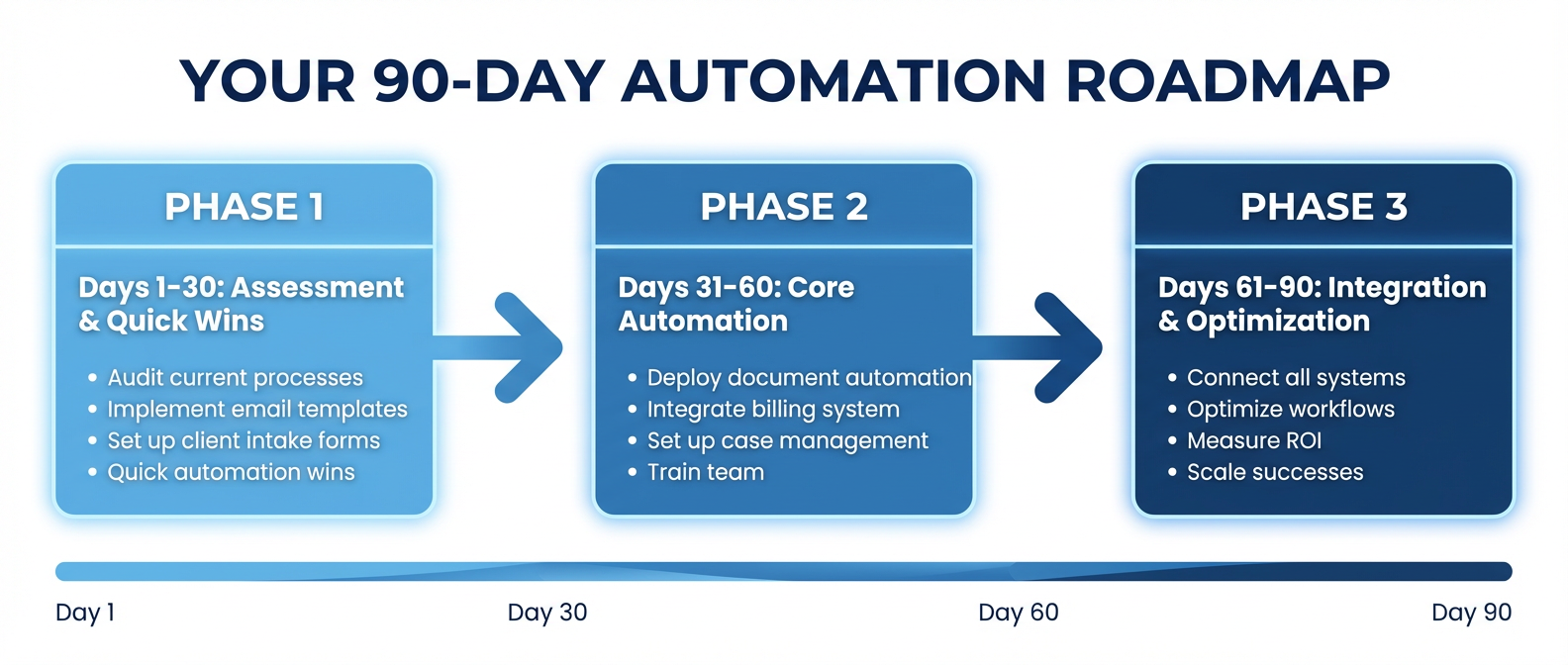
Your complete 90-day roadmap to a fully automated legal practice
Days 1-30: Foundation & Quick Wins
Week 1: Audit and Assess
Before buying any tools, understand your current state:
- Track every task you perform for one week
- Categorize tasks as: billable, administrative, or business development
- Note which tasks are repetitive and follow predictable patterns
- Calculate time spent on each category
Take our “How Streamlined Is YOUR Practice?” quiz to get a baseline assessment.
Week 2: Address Lead Response
Your highest-ROI automation is ensuring no lead falls through the cracks.
- Implement an AI embedded chat on your website
- Set up automated email responses for contact form submissions
- Create a simple CRM if you don’t have one (even a spreadsheet is better than nothing)
Weeks 3-4: Systematize Intake
Build on your quick wins:
- Create a standardized intake questionnaire for each practice area
- Implement online scheduling for consultations
- Design an automated follow-up sequence for leads who don’t immediately convert
Budget: $100-200/month
Days 31-60: Operational Efficiency
Week 5-6: Document Automation
Start with high-frequency documents:
- Identify your top 5 most-used document templates
- Convert them to automated templates with merge fields
- Implement electronic signature capabilities
Week 7-8: Communication Systems
Expand your AI communication:
- Configure an AI conversational chat trained on your firm’s FAQs
- Set up automated appointment reminders
- Create client status update templates
Budget: $200-400/month total
Days 61-90: Integration & Optimization
Week 9-10: Financial Automation
Get your billing house in order:
- Implement or optimize time tracking
- Set up automated invoice generation
- Configure payment reminders and online payment acceptance
Week 11-12: Connect the Systems
Make everything work together:
- Ensure your intake system feeds into your CRM
- Connect your document automation to client records
- Set up a centralized practice management dashboard
Budget: $400-700/month total (full implementation)
Download our “30-Day Automation Implementation Checklist” for a detailed task-by-task guide.
Choosing Your Investment Level Fof Streamline Legal Processes
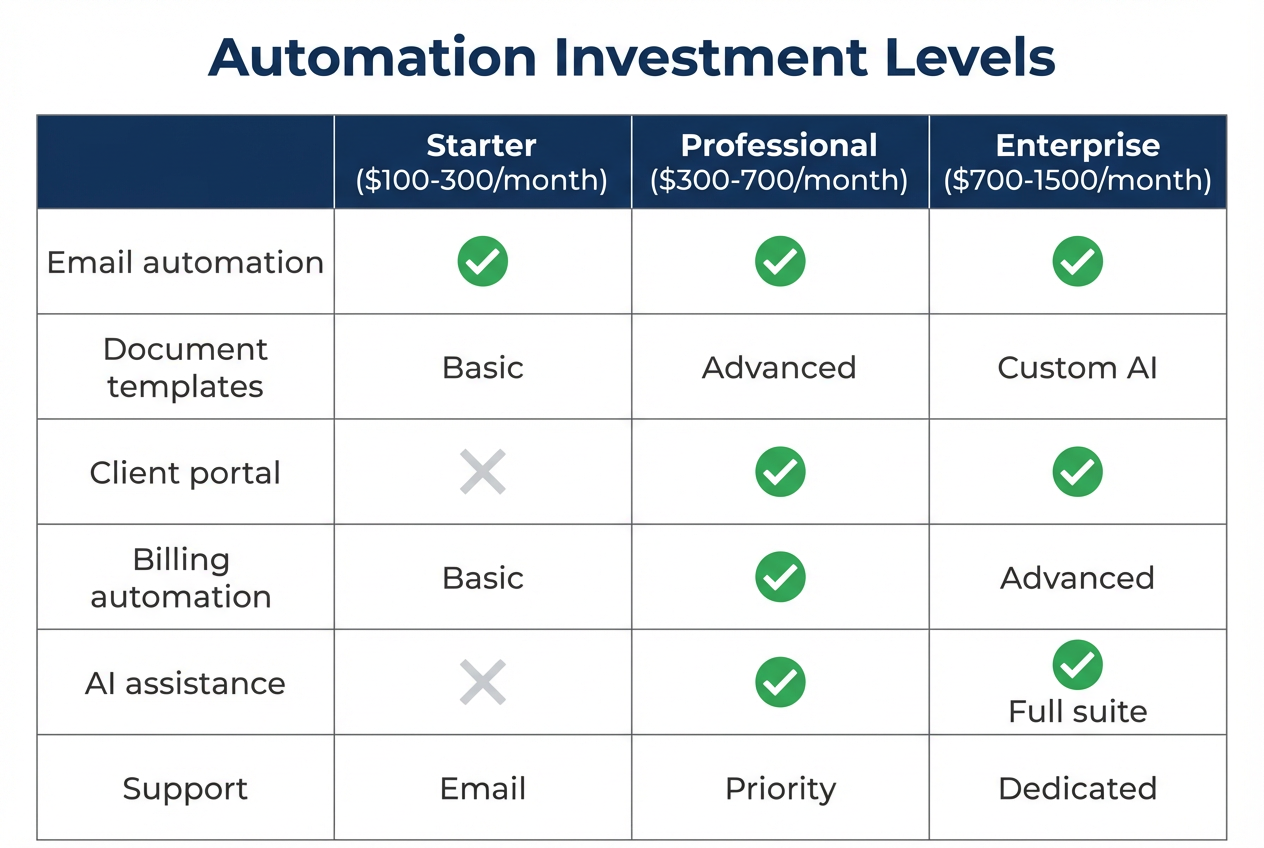
Select the investment level that matches your practice size and goals
Real Results: Case Studies & ROI Metrics
Let’s move from theory to proof. Here are real-world examples of attorneys who have transformed their practices through automation.
Case Study 1: The Personal Injury Solo Who Doubled Her Caseload
The Challenge: Sarah, a personal injury attorney in Phoenix, was drowning. Working 60+ hour weeks, she still couldn’t respond to leads fast enough. Her intake process was entirely manual—phone calls, paper forms, and handwritten notes transcribed into Word documents.
The Solution: Sarah implemented:
– AI phone system for 24/7 call handling
– Automated intake forms with conditional logic
– Document automation for demand letters and medical records requests
– Automated billing with online payments
The Results (6 months):
– Lead response time: 24 hours → 2 minutes
– New client conversions: +47%
– Administrative time: 25 hours/week → 8 hours/week
– Revenue: +38% (same working hours)
– Collection time: 52 days → 11 days
ROI: $450/month investment, $4,200/month additional revenue = 833% ROI
Case Study 2: The Family Law Firm That Stopped Losing Evenings
The Challenge: Martinez Family Law (3 attorneys, 1 paralegal) was losing potential clients because they couldn’t answer phones during court appearances. Staff spent hours daily on scheduling, rescheduling, and answering the same questions repeatedly.
The Solution: They deployed:
– AI receptionist for phone and web inquiries
– Automated consultation scheduling with calendar integration
– Client portal for secure document exchange
– Automated status update emails at case milestones
The Results (9 months):
– Missed calls: 35% → 0%
– Consultation no-shows: 28% → 7%
– Client satisfaction scores: +34%
– Staff overtime: Eliminated
– Partner work-life balance: “We actually take vacations now”
Case Study 3: The Criminal Defense Attorney Who Escaped Administrative Prison
The Challenge: Marcus handled 80+ cases simultaneously as a public defender turned private practitioner. Document creation alone consumed 15+ hours weekly. He had no system for tracking deadlines, and lived in constant fear of missing something critical.
The Solution: A phased implementation of:
– Document automation for standard motions and discovery
– Calendar automation with deadline tracking and alerts
– Integrated practice management
– Automated client communication for court date reminders
The Results (12 months):
– Document creation time: 15 hours → 4 hours weekly
– Missed deadlines: 2-3/year → 0
– Client complaints about communication: -80%
– Stress levels: “I sleep through the night now”
– Net new revenue (from reclaimed hours): +$72,000 annually
The Common Thread
Notice what these attorneys didn’t do:
– They didn’t hire more staff
– They didn’t work longer hours
– They didn’t sacrifice quality for efficiency
They simply stopped doing manually what technology could do better.
Calculate Your Potential ROI
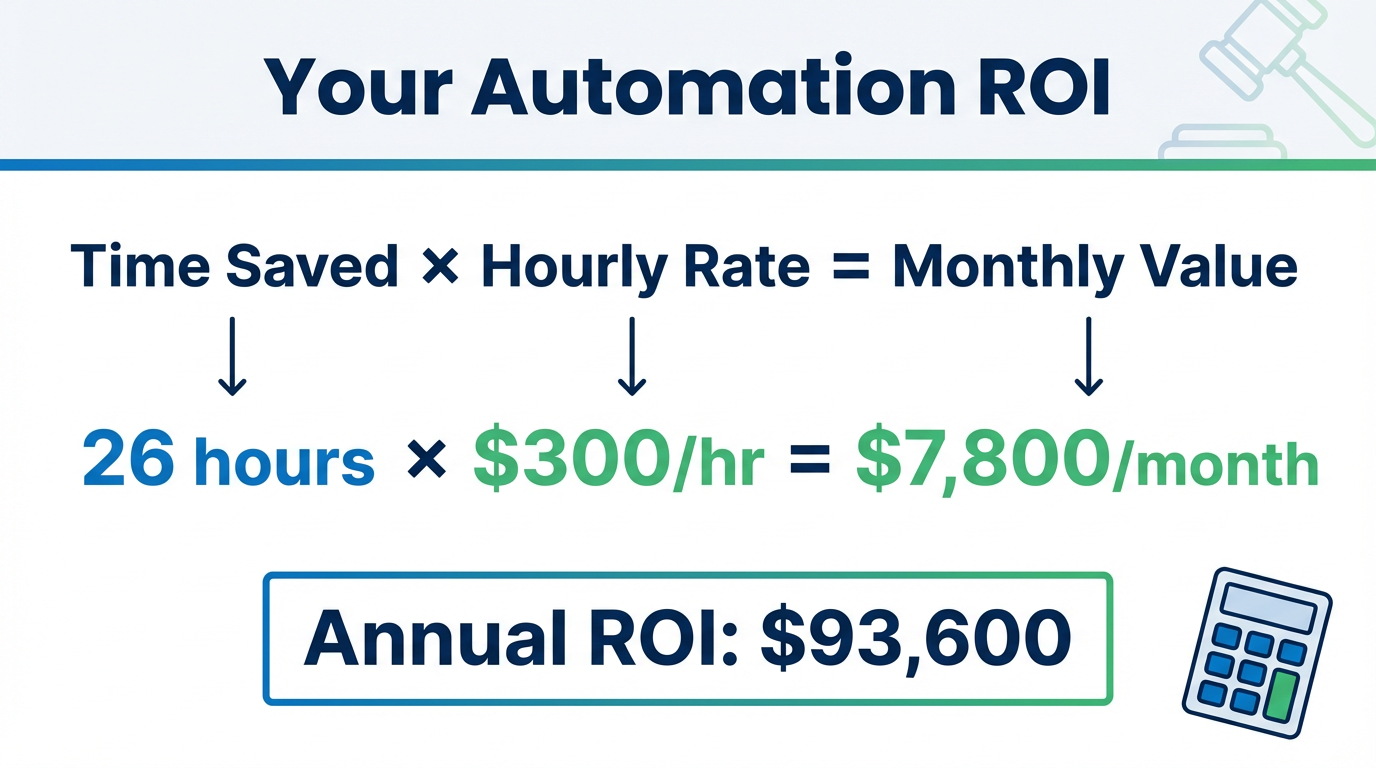
See the real numbers: how automation investments translate to significant annual returns
Your Streamlined Practice: Building the Action Plan
Ready to transform your practice? Here’s how to build your personalized automation action plan.
Step 1: The Self-Assessment Framework
Rate each area of your practice from 1-5 (1 = completely manual, 5 = fully automated):
Lead Response & Intake
– How quickly do leads receive a response? ___
– Is intake information automatically entered into your systems? ___
– Can potential clients self-schedule consultations? ___
Document Management
– Do you use automated templates with merge fields? ___
– Are signatures collected electronically? ___
– Is document storage organized and searchable? ___
Client Communication
– Can clients get answers to FAQs without calling? ___
– Are appointment reminders sent automatically? ___
– Do clients receive regular status updates? ___
Billing & Collections
– Is time tracking passive or automatic? ___
– Are invoices generated automatically? ___
– Do payment reminders send without manual intervention? ___
Practice Operations
– Are tasks automatically assigned when cases progress? ___
– Do you have a central dashboard for all matters? ___
– Are deadlines tracked with automated alerts? ___
Your lowest-scoring categories are your highest-priority automation opportunities.
Step 2: Budget-Based Recommendations
Starting Budget: Under $100/month
– Basic CRM (free tier of HubSpot, Clio, or similar)
– Simple website chatbot
– Online scheduling tool
– Basic document templates
Focus on: Lead capture and response time
Growth Budget: $100-500/month
– AI embedded chat with training
– Document automation with e-signatures
– Automated billing reminders
– Practice management basics
Focus on: Client intake automation and document efficiency
Optimization Budget: $500-1,000/month
– Full AI receptionist and phone system
– Comprehensive AI conversational chat
– Integrated practice management suite
– Advanced analytics and reporting
Focus on: Complete workflow automation and scaling
Step 3: Tool Selection Criteria
When evaluating virtual assistant for lawyer tools and automation platforms, consider:
Integration Capability
– Does it work with your existing tools?
– Are APIs available for custom connections?
– Is data portable if you switch systems?
Legal-Specific Features
– Trust accounting compliance
– Conflict checking capabilities
– Attorney-client privilege safeguards
– Bar association compliance features
Ease of Use
– How steep is the learning curve?
– Is support available when you need it?
– Can you customize without coding?
Scalability
– Will it grow with your practice?
– What are the per-user costs?
– Are there usage limits that could become expensive?
Watch our video “A Day in the Life: Manual vs. Automated” to see the practical difference these tools make.
 Ethics & Compliance Considerations for Legal AI
No discussion of AI solutions for lawyers would be complete without addressing the elephant in the room: ethics and compliance.
Client Confidentiality
When implementing AI tools, ensure:
- Data is encrypted in transit and at rest
- Servers are located in compliant jurisdictions
- Vendor contracts include confidentiality provisions
- AI systems are trained only on appropriate data
- Client communications are properly safeguarded
The AI Phone for Lawyers guide addresses attorney-client privilege compliance specifically for voice AI systems.
Supervision Requirements
AI doesn’t replace your professional judgment—it extends your capacity. You must:
- Review AI-generated documents before sending
- Ensure AI communications accurately represent your practice
- Monitor AI interactions for quality and accuracy
- Maintain human oversight of client-facing systems
Disclosure Obligations
Depending on your jurisdiction, you may need to:
- Disclose AI use in certain client communications
- Inform clients when they’re interacting with AI vs. humans
- Include AI use in engagement letters
Consult your state bar’s ethics opinions on AI for specific guidance. Most have issued guidance embracing AI use when properly supervised.
Data Security
Minimum requirements for any legal AI tool:
- SOC 2 compliance (or equivalent)
- HIPAA compliance (if handling medical records)
- Regular security audits
- Clear data retention and deletion policies
- Two-factor authentication
Frequently Asked Questions About Streamlining Legal Processes
What is legal process automation?
Legal process automation uses technology to handle repetitive administrative tasks without manual intervention. This includes client intake, document generation, scheduling, billing, and communication. The goal is to free attorneys from routine work so they can focus on substantive legal matters that require professional expertise.
How much can solo attorneys save by automating their practice?
Solo practitioners who implement comprehensive automation typically save 10-15 hours per week on administrative tasks. Converted to billable time at average rates, this represents $50,000-$100,000 in annual revenue opportunity. Additionally, automated intake and communication systems reduce client loss by 30-50%, adding significant new revenue.
What is the best legal chatbot solution for solo attorneys?
The best legal chatbot solution depends on your specific needs, but look for systems that can be trained on your firm’s specific information, integrate with your scheduling and CRM systems, and handle both website visitors and existing client inquiries. AI conversational chat systems offer the most flexibility for solo practitioners.
Is AI automation expensive for small law firms?
AI automation has become remarkably affordable. Basic implementations start under $100/month, with comprehensive solutions running $500-1,000/month for solo practitioners. Given that automation typically saves 10+ hours weekly and increases client conversion rates significantly, most attorneys see positive ROI within 60-90 days.
How do I implement AI without losing the personal touch?
AI handles routine tasks while you focus on meaningful client interactions. Rather than depersonalizing your practice, automation often improves client relationships—clients get faster responses, more consistent communication, and an attorney who isn’t exhausted from administrative work. The key is configuring AI systems to reflect your voice and values.
What tasks should attorneys automate first?
Start with lead response and intake—this has the highest ROI impact because slow response time is the #1 cause of lost clients. Follow with document automation (highest time savings) and then billing automation (fastest impact on cash flow). See our client intake automation guide for detailed implementation steps.
Are there ethical concerns with using AI in legal practice?
AI use in legal practice is generally ethical when properly supervised. Key considerations include maintaining client confidentiality, reviewing AI-generated work product, disclosing AI use when appropriate, and ensuring data security. Most state bars have issued favorable guidance on AI use with appropriate oversight.
Can AI really handle legal intake calls?
Yes. Modern AI phone systems can conduct natural conversations, understand caller needs, collect relevant information, determine urgency, and schedule appointments. They handle after-hours calls that would otherwise go to voicemail, capturing leads that previously went to competitors.
How long does it take to implement legal automation?
A basic automation foundation can be implemented in 30 days. Comprehensive practice automation, including intake, documents, billing, and communication, typically takes 60-90 days for full implementation. The key is phased implementation, starting with highest-impact areas and building systematically.
What’s the difference between automation and AI for law firms?
Traditional automation follows fixed rules (if X happens, do Y). AI adds intelligence—understanding natural language, adapting to context, learning from interactions, and handling complex scenarios. For example, automation might send a generic email when someone fills out a form; AI can have a conversation to understand their specific needs and respond appropriately.
Do I need technical skills to use legal AI tools?
No. Modern attorney AI software is designed for attorneys, not IT professionals. Most systems offer intuitive interfaces, guided setup, and customer support. If you can use email and basic office software, you can implement legal AI tools. Many vendors also offer white-glove setup services.
How do I measure ROI on legal automation?
Track these metrics before and after the streamline legal processes implementation: lead response time, lead-to-client conversion rate, time spent on administrative tasks, document creation time, collection time on invoices, and client satisfaction scores. Most attorneys see measurable improvement within 60 days. Our AI Employees guide includes detailed ROI frameworks.
 Your Next Steps: From Overwhelmed to Optimized
You’ve read this far, which means you’re serious about transforming your practice. Here’s what to do next:
Today:
– Take our “How Streamlined Is YOUR Practice?” quiz to identify your biggest opportunities
– Calculate your current lead response time and lost opportunity cost
This Week:
– Complete the self-assessment framework from Section 6
– Identify your top 3 automation priorities
– Research one tool in each priority area
This Month:
– Implement your first automation (start with lead response—highest ROI)
– Download the “30-Day Automation Implementation Checklist” for step-by-step guidance
– Track your metrics to measure improvement
This Quarter:
– Expand to document and billing automation
– Integrate systems for end-to-end workflow
– Evaluate results and optimize
The Practice You Deserve Is Within Reach
Remember that attorney at 9:47 PM, drowning in administrative tasks while potential clients slip away?
That doesn’t have to be you.
The technology to streamline legal processes exists today—accessible, affordable, and specifically designed for solo practitioners and small firms. Every hour you spend on tasks that could be automated is an hour taken from your clients, your family, and yourself.
The attorneys who thrive in 2026 and beyond won’t be the ones who work the longest hours. They’ll be the ones who leverage technology to work the smartest hours.
Your automated practice is waiting. The only question is: how long will you wait to build it?
Ready to see how AI can transform your practice? Explore our complete library of legal automation resources or visit Dragonmatics to discover AI-powered solutions built specifically for attorneys like you.
Related Articles:
– Client Intake Automation for Lawyers
– Document Automation for Legal Practices
– Invoice & Billing Automation for Law Firms
– Practice Management Automation Guide
– The Complete Guide to AI Employees for Solo Attorneys