
You’ve automated your intake. Your billing runs on autopilot. Documents generate themselves. But here’s the thing: you’re still copying client info from one system to another. You’re still manually triggering the next step. Things still fall through the cracks.
You’ve got automation. But you don’t have a system.
This is where most solo attorneys and small firms get stuck. They’ve invested in tools. They’ve set up individual automations. Each piece works fine on its own. But the pieces don’t talk to each other. The result? You’re still the glue holding everything together. You’re still the one making sure Step A triggers Step B.
That’s not automation. That’s just faster manual work. Real practice management automation means building a connected system where every piece triggers the next, data flows automatically, and nothing requires you to remember, copy, or chase. Let’s build that system.
What a Connected Practice Actually Looks Like
Picture this: A potential client calls your office at 9:17 PM on a Tuesday. Your Voice AI answers, captures their information, qualifies them as a good fit for your personal injury practice, and sends them a booking link. By 9:22 PM, they’ve scheduled a consultation for Thursday morning.
Wednesday, they get an automatic reminder with your office address and what to bring. Thursday morning, they show up. You sign them. The engagement letter generates automatically from the intake data they already provided. They e-sign on your tablet before they leave.
The moment they sign, their first invoice generates and sends. Their information populates in your case management dashboard. A welcome email goes out with next steps. A task assigns to your paralegal to request medical records. You never touched any of it.
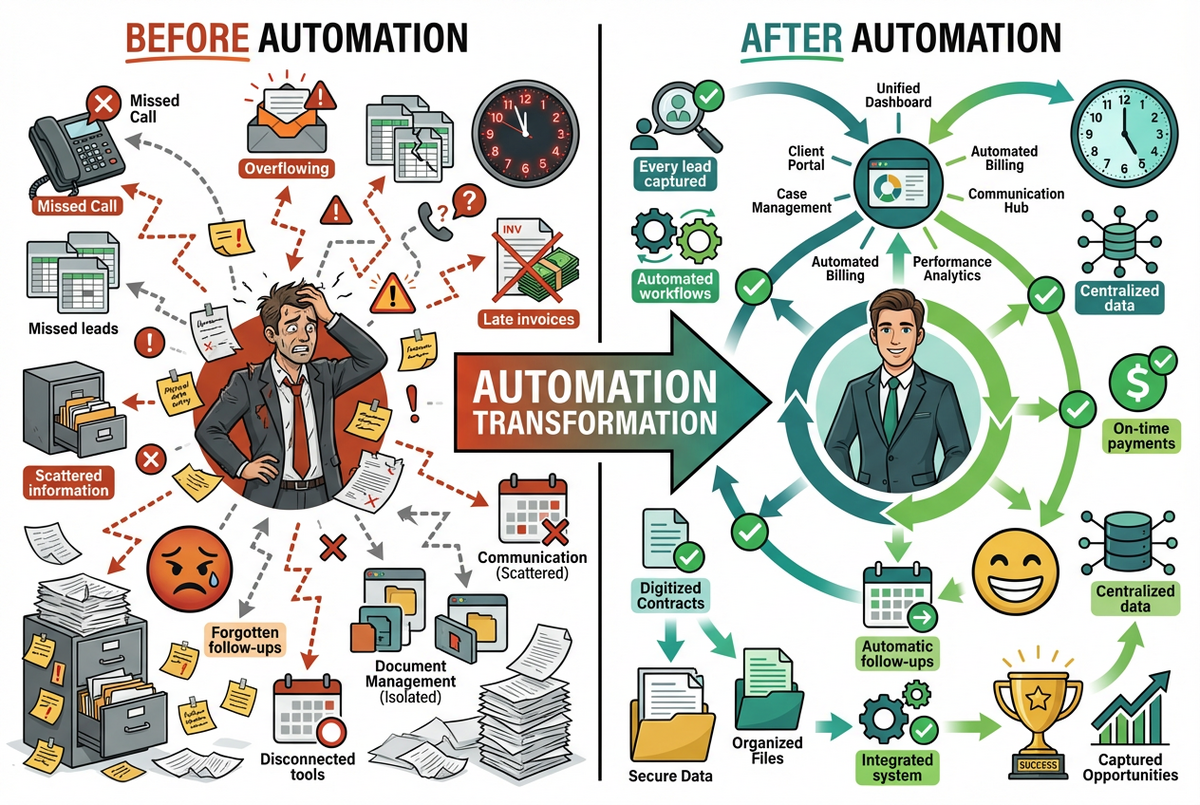
That’s what a connected practice looks like. Every step triggers the next. Data enters once and flows everywhere it needs to go. You handle the legal work. The system handles everything else.
The Complete Client Journey: From First Contact to Final Invoice
Let’s walk through exactly how this works. We’ll use a personal injury case as our example, but the principles apply to any practice area. The goal is simple: show you how each automation component connects to the next, creating one continuous workflow with zero manual handoffs.
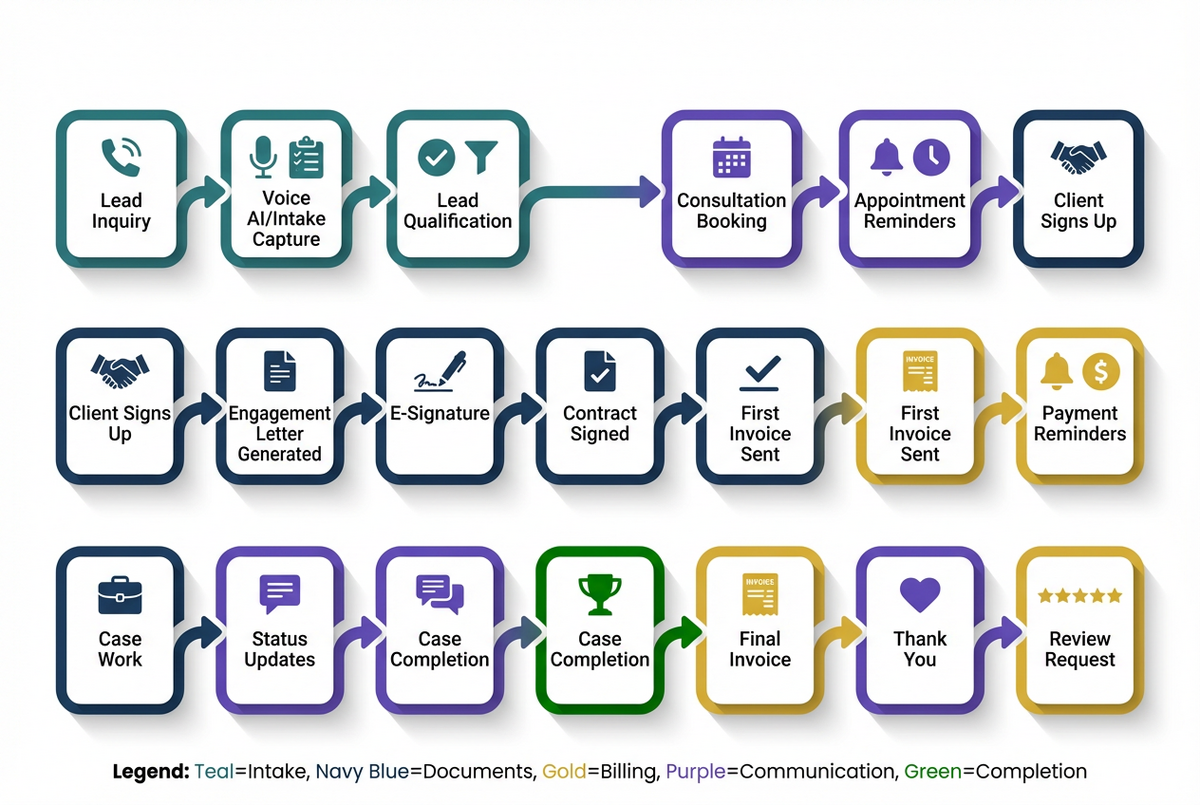
Stage One: Lead Capture
The journey starts when someone reaches out. Maybe they call after hours and your Voice AI answers. Maybe they fill out your website intake form at 2 AM. Either way, the system captures their information immediately.
The Voice AI doesn’t just answer the phone. It asks qualifying questions. It determines if this is a case you can help with. It captures the essential details: accident date, injuries, insurance information, how they heard about you. All of this flows into your system automatically. No voicemail. No missed opportunity.
For a deeper look at how this works, see our Voice AI for Law Firms guide.
Stage Two: Qualification and Booking
Here’s where the magic starts. The system evaluates the lead based on rules you’ve set. Is this the type of case you take? Is it within your geographic area? Does the timeline work?
If yes, the potential client immediately receives a booking link via text and email. No delay. No waiting for you to review and respond in the morning. They can schedule a consultation right then, while they’re motivated and before they call another attorney.
If the case isn’t a fit, the system sends a polite decline with referral suggestions. Either way, you’re not manually sorting through messages at 7 AM trying to figure out who to call back first.
Stage Three: Pre-Consultation Automation
Once they book, the automation kicks into higher gear. Confirmation emails send immediately with your office address, parking instructions, and what documents to bring. Reminder texts go out 24 hours before, then 2 hours before.
But there’s more happening behind the scenes. The system creates a preliminary client record. It pulls together the information they’ve already provided into a consultation summary you can review before they walk in. If you use a detailed intake process, you can even send them a questionnaire to complete beforehand.
For more on building effective intake workflows, check out our Client Intake Automation guide.
Stage Four: Engagement and Onboarding
They show up. You take the case. Now what?
In a disconnected practice, this is where things get messy. You need to generate an engagement letter. You need to collect a retainer. You need to send welcome materials. You need to create their file. You need to assign tasks to your team. Every step requires you to do something.
In a connected system, signing the client triggers everything. The engagement letter auto-generates using the intake data already in the system. Their name, address, case type, fee arrangement, all pre-populated. They sign electronically. The moment they sign, a cascade begins.
Their first invoice generates and sends. A welcome email delivers with client portal access. Their matter creates in your case management dashboard. Tasks assign automatically: request medical records, send records authorization forms, schedule follow-up call.
For the document generation piece, see our Document Automation guide.
Stage Five: Active Case Management
This is where most attorneys think automation ends. It doesn’t.
Throughout the case, the system keeps working. Status update emails send automatically at intervals you define. Deadline reminders trigger for both you and the client. If you’re waiting on documents from the client, reminder sequences nudge them automatically.
Payment reminders send when invoices are due. Thank you confirmations send when payments process. You’re not chasing people. The system does it for you, professionally and consistently.
For billing automation specifically, read our Billing Automation guide.
Stage Six: Case Completion and Follow-Up
The case resolves. In a disconnected practice, this is where client relationships often end. You send a final invoice, close the file, and that’s it.
In a connected system, case completion triggers its own workflow. Final invoice sends automatically. A case summary generates for your records. A thank you email goes to the client. A week later, a request for a Google review. A month later, a check-in email asking how they’re doing.
Six months from now, they get a holiday greeting. A year from now, a reminder that you’re still here if they need anything. Former clients become referral sources, automatically nurtured, without you having to remember or do anything.
How the Components Work Together
Understanding the individual pieces is one thing. Understanding how they integrate is where real efficiency comes from.
Voice AI Plus Intake
Your Voice AI captures information during the call. That information flows directly into your intake system. No transcription. No re-entry. The caller’s name, contact info, case details, and qualifying answers all populate automatically.
This means when you review leads in the morning, you’re not listening to voicemails and typing notes. You’re looking at structured data, ready to act on.
Intake Plus Documents
Every piece of information captured during intake becomes available for document generation. Client name and address? Pulled into the engagement letter. Case type and fee arrangement? Inserted automatically. Opposing party information? Pre-populated in pleadings.
You set up the templates once. From then on, documents generate themselves using real client data.
Documents Plus Billing
When an engagement letter is signed, the system knows. That signature triggers invoice generation. The retainer amount from the agreement populates the invoice automatically. The invoice sends to the email address already on file.
No manual invoicing. No forgetting to bill. No delayed cash flow because you got busy with actual legal work.
Billing Plus Communication
Payment received? The system sends a thank you confirmation. Payment overdue? The system sends a polite reminder. Still overdue? A second reminder, then a third, escalating in tone based on rules you set.
You’re not writing awkward collection emails. You’re not wondering who hasn’t paid. The system handles it, consistently and professionally.
Calendar Plus Everything
Your calendar becomes the backbone of the operation. Consultation booked? Reminders send automatically. Court date set? Preparation tasks assign a week before. Deadline approaching? Notifications go to you and your team.
Everything connects to time. And the calendar connects to everything.
Practice Area Workflow Examples
Let’s get specific. Here’s how complete automation looks in three common practice areas.
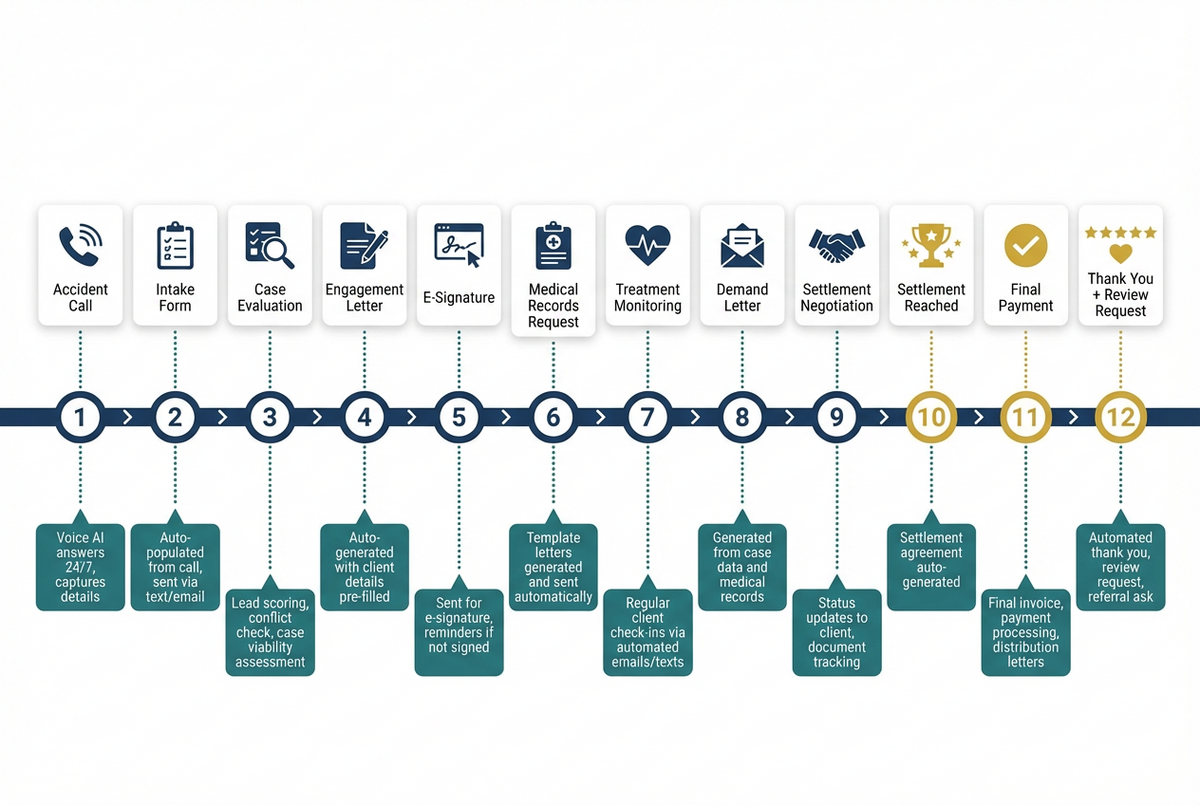
Personal Injury: From Accident to Settlement
The client calls after a car accident. Voice AI captures accident details, injury information, and insurance data. They book a consultation and show up two days later. You take the case.
The system generates a contingency fee agreement and medical records authorization. Both sign electronically. Tasks automatically assign: request police report, send demand to insurance, order medical records.
As records come in, you update the case status. Status change triggers an update email to the client. When treatment completes, a task reminds you to evaluate for demand letter. Settlement arrives. Final disbursement generates. Case closes. Review request sends.
Every step is tracked. Every transition is automatic. The client stays informed. You stay focused on the legal strategy.
Family Law: From Inquiry to Final Decree
Someone fills out your intake form for a divorce consultation. The system qualifies them based on county and complexity. They book a consultation.
You take the case. Retainer agreement generates with their information pre-populated. They sign and pay. Welcome packet sends with initial questionnaire.
Discovery deadlines trigger task reminders. Court date approaches, preparation tasks assign. Hearings complete, status updates send. Final decree enters. Closing documents generate. Case closes. Follow-up sequence begins.
The emotional nature of family law makes consistent communication critical. Automation ensures every client gets the same professional experience, even when you’re in court all week.
Immigration: From Visa Inquiry to Approval
A potential client inquires about an H-1B visa. Intake form captures employment details, education background, and timeline. Consultation books.
You evaluate the case and sign them. Engagement letter generates. Document checklist sends automatically with explanations of what’s needed and why.
As documents upload to the client portal, you receive notifications. When all documents are in, a task triggers for you to review. Filing happens. Confirmation sends to client. Status check reminders send at appropriate intervals.
Approval arrives. Congratulations email sends automatically. Review request follows. Referral request sends a month later.
Immigration cases often span months or years. Automation keeps clients informed throughout without requiring you to remember where each case stands.
The Dashboard View: Complete Visibility
All of this automation means nothing if you can’t see what’s happening. A connected system gives you a central dashboard showing your entire practice at a glance.
You see every active lead and where they are in the intake process. You see every client and their case status. You see pending tasks, upcoming deadlines, and overdue items. You see revenue numbers: billed, collected, outstanding.
More importantly, you see bottlenecks. Where are leads dropping off? Which automations fire most often? Where do cases stall? This visibility lets you continuously improve, identifying weak points and strengthening them.
Getting Started: Your Implementation Roadmap
Here’s the good news: you don’t have to build all of this at once. In fact, you shouldn’t. The attorneys who succeed with practice management automation start small and expand gradually.
Month One: Intake to Consultation
Start with the front end. Set up your intake form or connect your Voice AI. Build the workflow that takes a lead from first contact to booked consultation. Get the reminders working. Master this piece before moving on.
Month Two: Consultation to Engagement
Now extend the chain. Connect your document automation to generate engagement letters from intake data. Set up e-signature. Build the workflow that triggers when a client signs. Get comfortable with conditional logic: if they sign, then this happens.
Month Three: Billing and Communication
Add the billing layer. Connect invoice generation to signed agreements. Set up payment reminders. Build out your client communication sequences: welcome emails, status updates, check-ins.
Months Four and Beyond: Refinement and Expansion
Now you have a connected system. From here, you refine. You add practice-area-specific workflows. You build more sophisticated conditional logic. You integrate additional tools as needed.
The key is patience. Each piece you add makes the next piece easier. Each connection you build creates more leverage. Six months from now, your practice will run differently than it does today.
The Future of Your Practice
You became a lawyer to practice law. Not to chase payments, not to manually send reminders, not to copy data between systems. Practice management automation gives you your practice back.
The attorneys who thrive in the coming years will be the ones who build systems, not just collect tools. They’ll be the ones whose practices run whether they’re in the office or not. They’ll serve more clients, more profitably, with better experiences.
You’ve read about the individual pieces. Voice AI for answering calls. Client intake for capturing leads. Document automation for generating paperwork. Billing automation for getting paid. Now you’ve seen how they connect into something bigger.
The question isn’t whether to automate. It’s whether to keep running disconnected tools or build an actual system. The choice is yours. The technology is ready. Your practice is waiting.
For a complete overview of automation possibilities for your firm, visit our comprehensive guide to law firm automation.
References
American Bar Association. (2024). Legal Technology Survey Report. Retrieved from https://www.americanbar.org/groups/law_practice/resources/tech-report/
Clio. (2024). Legal Trends Report. Retrieved from https://www.clio.com/resources/legal-trends/
Thomson Reuters. (2024). State of the Legal Market Report. Retrieved from https://www.thomsonreuters.com/en-us/posts/legal/state-of-the-legal-market-2024/
Law Practice Today. (2023). Workflow Automation for Small Firms. American Bar Association.
Legal Technology Resource Center. (2024). Practice Management Software Buyer’s Guide. American Bar Association.